
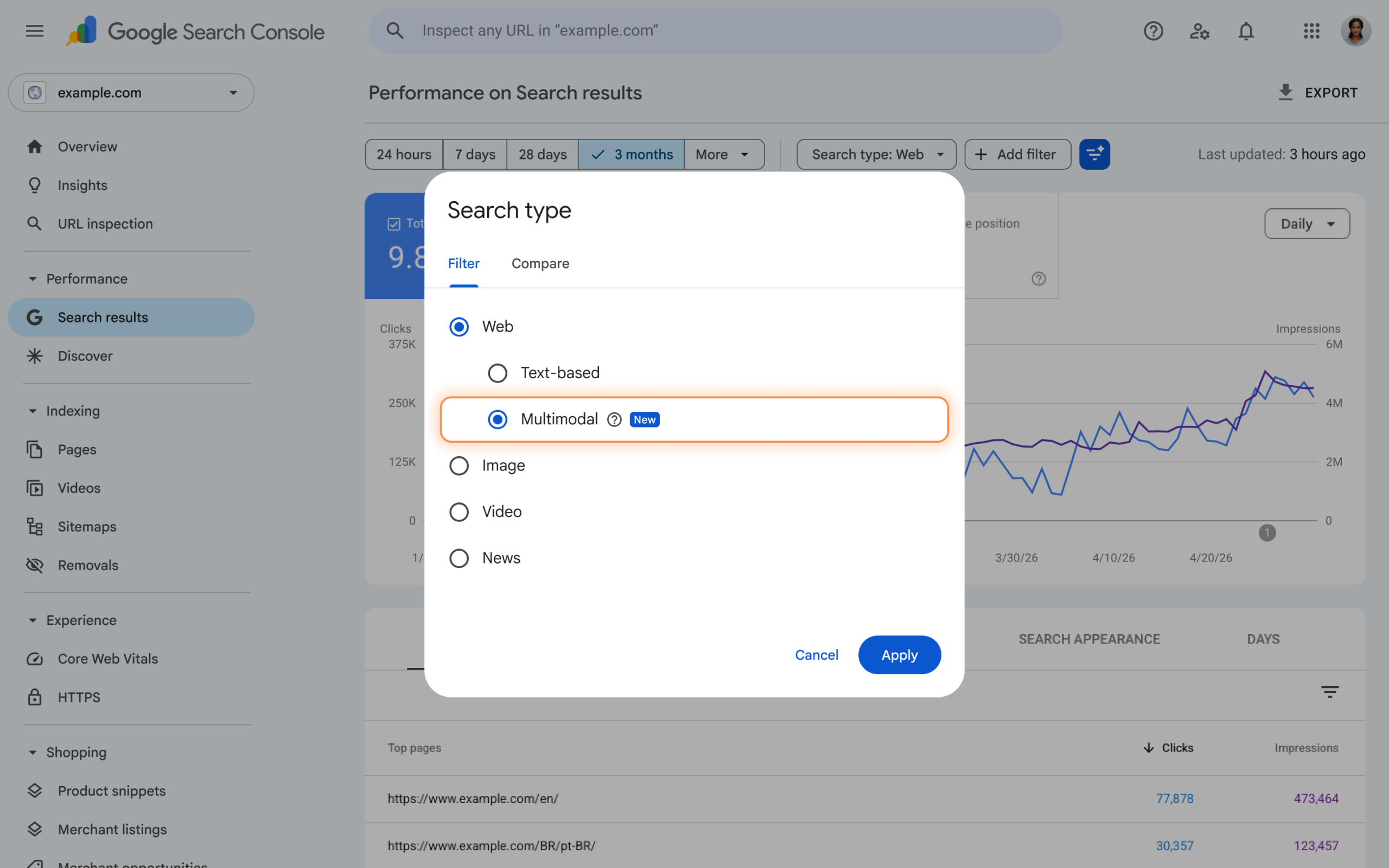
Google Search Console now shows how much web traffic comes from searches that start with an image instead of typed words. The new "Web: multimodal" option appears in the Performance report and the generative AI features report, and it covers searches made with tools like Google Lens and Circle to Search.
For anyone who has wondered why some pages get visits that match no keyword they track, this is the first real clue.
Multimodal search performance reporting in Search Console is a search type filter that separates web results triggered by images, photos or screenshots from text-based web searches. Google announced it on its Search Central blog in September 2026. It shows impressions, clicks and other standard metrics for that image-led traffic, so site owners can finally measure it.
Several industry write-ups, including Derivatex, ALM Corp and Digital Applied, date the rollout to September 24, 2026. The official post is titled Announcing web multimodal Search performance reporting in Search Console.
A quick note on sourcing: the details below come from that announcement's title and from the three independent write-ups. Where they disagree or are silent, I say so.
A multimodal search is any search where the person gives Google something other than plain typed text, most often a picture. According to the coverage above, the new filter tracks searches started through:
Typing a question and adding a photo to it also falls under this idea. The person is mixing text, pictures and sometimes voice, and Google tries to understand all of it at once.
That is why the word "multimodal" shows up. It simply means more than one input type.
You'll find the filter inside the Web search type in the Performance report. Coverage from ALM Corp says Web now splits into text-based results and multimodal results. The same filter also appears in the generative AI features report, which tracks how your pages show up in AI-powered results such as AI Overviews.
Two practical details matter here:
Multimodal data in Search Console covers pages, countries, devices and dates. For classic search results, it also includes impressions and clicks. That is enough to answer a basic question: which of my pages do people reach after searching with a picture?
Here is the part many site owners will find frustrating. The queries dimension is not available for multimodal searches. ALM Corp quotes Google saying query data isn't available for them, and Derivatex explains why: these searches mostly use images, not words, so there is no keyword to report. Digital Applied treats this point as unconfirmed, so check your own report to see exactly what you get.
| What you can usually see | What you usually can't see |
| Pages that get multimodal traffic | The actual query or photo used |
| Impressions and clicks | The searcher's intent |
| Countries and devices | A matching keyword for each visit |
| Date trends | Clear dedicated AI click counts |
In short, you learn where the traffic lands, not why.
Not clearly. Both ALM Corp and Digital Applied note that the Search Analytics API reference lists search types such as web, image, video, news, Discover and Google News, but no separate multimodal value. The official announcement doesn't appear to mention API or bulk export support either, based on the coverage available.
Until that changes, the manual Export button in the interface is your safest route. If you rely on dashboards that pull from the API, expect a gap for now.
Visual search has been growing for years, but site owners had no way to see it. Multimodal traffic used to sit mixed into general Web numbers, or never showed up at all. Now you can look at it on its own.
That matters for a few reasons.
Product and shopping pages may gain the most: People photograph a pair of shoes, a plant, a part they need to replace. If your pages match what the camera sees, you can get found without ranking for any typed phrase.
Images become landing-page signals: Google has to match a photo to a page. Clear product images, descriptive file names and accurate alt text help it connect the two. This is classic image SEO, but it now has a number attached.
Your keyword reports tell only half the story: If your top queries don't explain your traffic, some of it may come from image-led searches that never had a query.
You can't see the query, so you work from the page side. Start with the pages that already pull multimodal visits.
Use sharp, original images: A clear, well-lit photo that shows the product or subject from useful angles is easier to match than a stock picture.
Write real alt text: Describe what the picture shows in plain words. "Blue ceramic coffee mug with wooden handle" beats "mug" or a keyword string.
Name files sensibly: blue-ceramic-mug.jpg helps more than IMG_4482.jpg.
Put the answer near the image: If someone photographs a plant, they probably want its name and care tips. Put those in the first lines near the image, not buried under a long intro.
Add structured data where it applies: Product, recipe and article markup gives Google extra detail about what the page is.
Keep pages fast on mobile: Most Lens and Circle to Search use happens on a phone.
Test it yourself: Take a photo of one of your products or a screenshot of your own page and run a Lens search. See what comes back. It's a rough check, but it fills in the intent that Search Console won't show you.
Google is blending image understanding with AI-written answers. The fact that the new filter lives in both the Performance report and the generative AI features report shows how closely these two areas now sit together.
For answer engine optimization (AEO), the lesson is simple. Pages that answer a clear question, back it up with a good image, and organize facts so a machine can extract them stand a better chance of being used. That means short, direct answers near the top, clean headings, and facts that match what's in your images.
For generative engine optimization (GEO), the goal is to be the source an AI system trusts. Clear authorship, accurate details and consistent product information across your site and listings all help.
Three open questions are worth tracking over the coming weeks. Will Google add a multimodal value to the Search Analytics API? Will it release more detail on how these searches are counted, or add a way to see anything about intent? And will historical data become available, or will it only run forward from the launch?
Until those answers arrive, the smartest move is to start exporting now and build your own baseline.
It's a search type option that reports web results triggered by image-led searches, such as Google Lens or Circle to Search. It shows how often your pages appear and get clicked from those searches, separate from regular text-based Web traffic.
According to coverage of the launch, no. The queries dimension isn't available because these searches mostly start with a picture, not typed words. You see pages, countries, devices and dates instead.
Reports list Google Lens, Circle to Search on Android, image uploads to Google Search and Chrome's "Search this image" option. Each of these starts with an image or screenshot instead of a typed phrase.
The filter only appears for properties that already receive multimodal traffic, and Google is rolling it out gradually. If you don't see it, check again later and make sure your property is verified.
It doesn't look like it yet. The Search Analytics API lists several search types but no multimodal one, so export from the Search Console interface for now.
It might. Industry coverage advises noting the date the filter first appears so you can explain any shift in totals instead of mistaking it for a ranking change.
Use original, clear images, write accurate alt text, name your files well, add structured data, and put a direct answer near the top of the page. Then check which pages gain multimodal impressions and improve those first.
Be the first to hear about our offers and announcements.


Copyright @ Hovo Digital - A Brand by Urbanklip Tech Private Limited
