
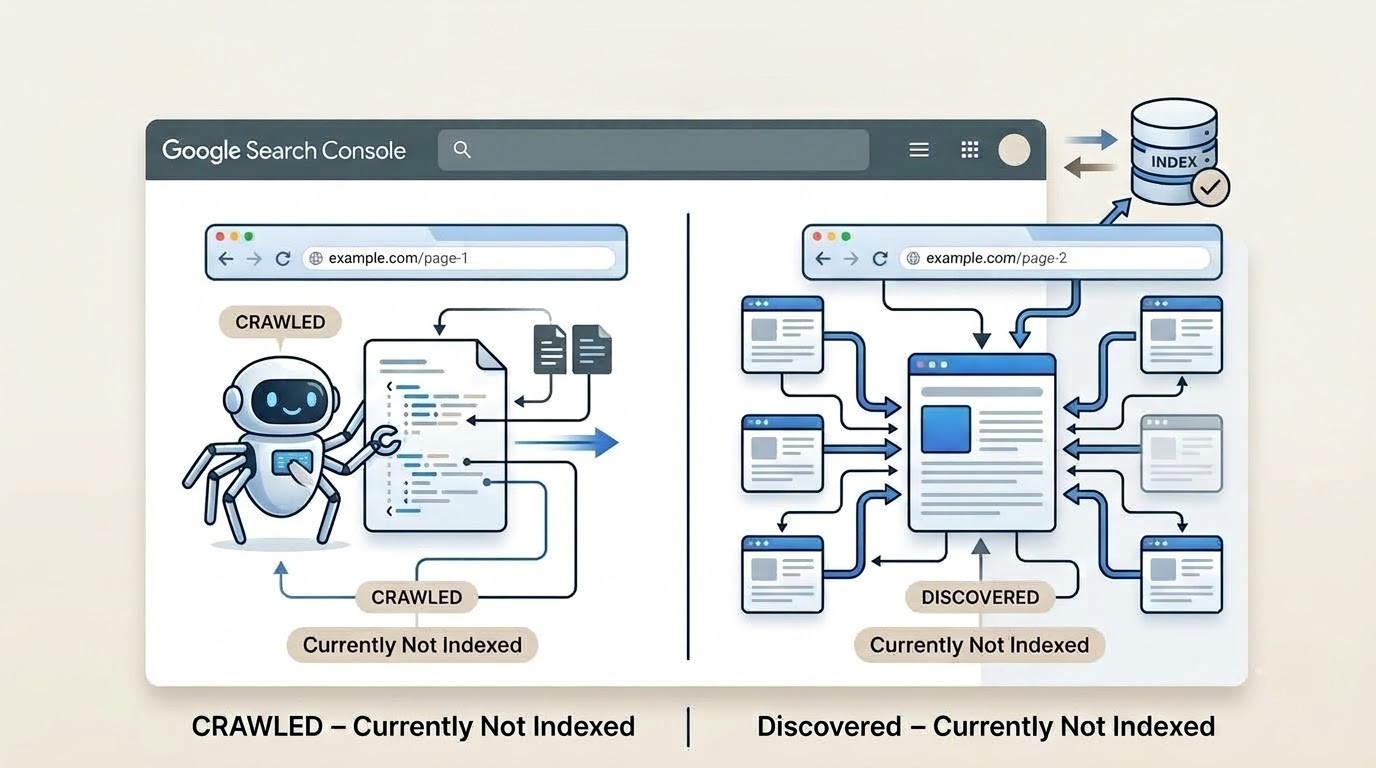
Quick answer: "Discovered – currently not indexed" means Googlebot knows a URL exists but hasn't visited it yet — usually a crawl-priority problem. "Crawled – currently not indexed" means Google already visited the page, read it, and chose to leave it out of the index — usually a quality or relevance problem. Same red box in Google Search Console, completely different fix.
If you've stared at your Page Indexing report and mixed these two up, you're not alone. Half the forum threads on Google's own Search Central community exist because someone applied a "Discovered" fix to a "Crawled" problem, waited six weeks, and got nowhere. So let's actually pull these apart.
Google found your URL. Maybe through your sitemap, an internal link, or a backlink from another site. It added that URL to a queue. And then... nothing happened yet. Google discovers a URL exists but hasn't actually sent Googlebot to fetch its HTML, code, or assets.
This is a before-crawling problem. Google is essentially saying, "I know you're there, I just haven't gotten around to you." Google's own documentation frames the typical cause as wanting to avoid overloading a site with crawl requests. However, practitioners who've dug into large datasets argue that's an incomplete explanation — low crawl demand and Googlebot simply being busy elsewhere on a domain matter just as much.
Common triggers:
This one is more serious. Googlebot showed up, downloaded the page, rendered it, evaluated it — and decided against adding it to the index. Google has already visited the page in this case, unlike the "Discovered" status, where the URL is known but hasn't been crawled for some reason yet.
This is an after-crawling, quality-driven rejection. Google isn't confused about whether your page exists. It's decided the page isn't worth serving. This status typically shows up when Google crawls a page successfully but chooses not to index it because another page already satisfies the same search intent better.
Common triggers:
Worth knowing: this status also appears on pages that were indexed at some point and later dropped. Independent analysis of the "crawled – currently not indexed" label has found that roughly 70–80% of affected pages were previously indexed and were then actively removed by Google, rather than simply waiting in a queue. That reframes the whole problem for a lot of sites — you're not looking at pages stuck in limbo, you're looking at pages Google used to trust and stopped trusting. That's a very different conversation with your content team.
| Discovered – Not Indexed | Crawled – Not Indexed | |
| Has Google visited the page? | No | Yes |
| Root cause | Crawl priority/scheduling | Content quality/relevance |
| Typical fix | Internal linking, sitemaps, crawl demand | Content rewrite, deduplication, E-E-A-T |
| Urgency on important pages | Moderate — often self-resolves | High — signals an active rejection |
| Where in the pipeline | Discovery → stuck here → Crawling | Discovery → Crawling → stuck here → Indexing |
Mixing these two up wastes real time. If your page is stuck in "Discovered" and you respond by rewriting the content, you haven't touched the actual bottleneck — Google still hasn't crawled it, so your rewrite is invisible until a crawl happens. Flip it around: if a page is "Crawled – currently not indexed" and you respond by clicking Request Indexing over and over, you're asking Google to re-evaluate content it has already judged and rejected. Google visited the page, decided it doesn't add unique value to the index, and moved on — resubmitting through Request Indexing will not change that outcome.
There's also a scale question. Search Console lists sixteen distinct reasons a page can go unindexed, and some are dramatically more common than others — redirects alone account for roughly a quarter of not-indexed URLs across sampled sites. Not every gray bar in your report deserves a fire drill. A handful of low-priority URLs sitting in either status is normal housekeeping. A rising trend on pages you actually want ranking is the signal worth chasing.
Not every appearance of either status is a problem. Paginated archive pages, RSS feed URLs, and intentionally thin utility pages often show up in these reports, and that's fine — they were never meant to rank on their own. Before you spend a week "fixing" a status, ask whether the page was ever supposed to stand alone in search results.
Discovered means "not yet visited." Crawled means "visited and rejected." One is a queue problem you fix with links and crawl signals; the other is a trust problem you fix by making the content genuinely worth serving. Diagnose which one you're actually looking at before you touch anything — the two statuses call for opposite playbooks, and applying the wrong one just burns time you could've spent on the fix that actually works.
Is "Crawled – currently not indexed" worse than "Discovered – currently not indexed"?
Generally yes, on pages you actually want to rank. "Discovered" is a scheduling delay; "Crawled" is a judgment call Google already made against your page.
Can a page move from "Discovered" to "Crawled" on its own?
Yes. Once Google prioritizes and fetches the URL, the status updates automatically — no action from you triggers that transition beyond making the page easier to find and crawl.
Does clicking "Request Indexing" fix either status?
It can nudge a "Discovered" page toward being crawled sooner. It rarely helps a "Crawled – currently not indexed" page, since Google has already evaluated that content once.
How long can a page sit in either status?
Anywhere from days to several months. Google doesn't publish a fixed timeline, and pages can remain excluded indefinitely if the underlying quality or crawl-priority issue never changes.
Should I worry about a handful of URLs in these statuses?
Not usually. A small, stable number on low-priority pages is normal. Investigate when the count is rising, concentrated on important pages, or growing without an obvious cause.
Be the first to hear about our offers and announcements.


Copyright @ Hovo Digital - A Brand by Urbanklip Tech Private Limited
